Vigor Solitaire for Seniors
- 4.9
- Rating
- 50.00K
- Installs
- Free
- Price

 Analysis by App-foxy
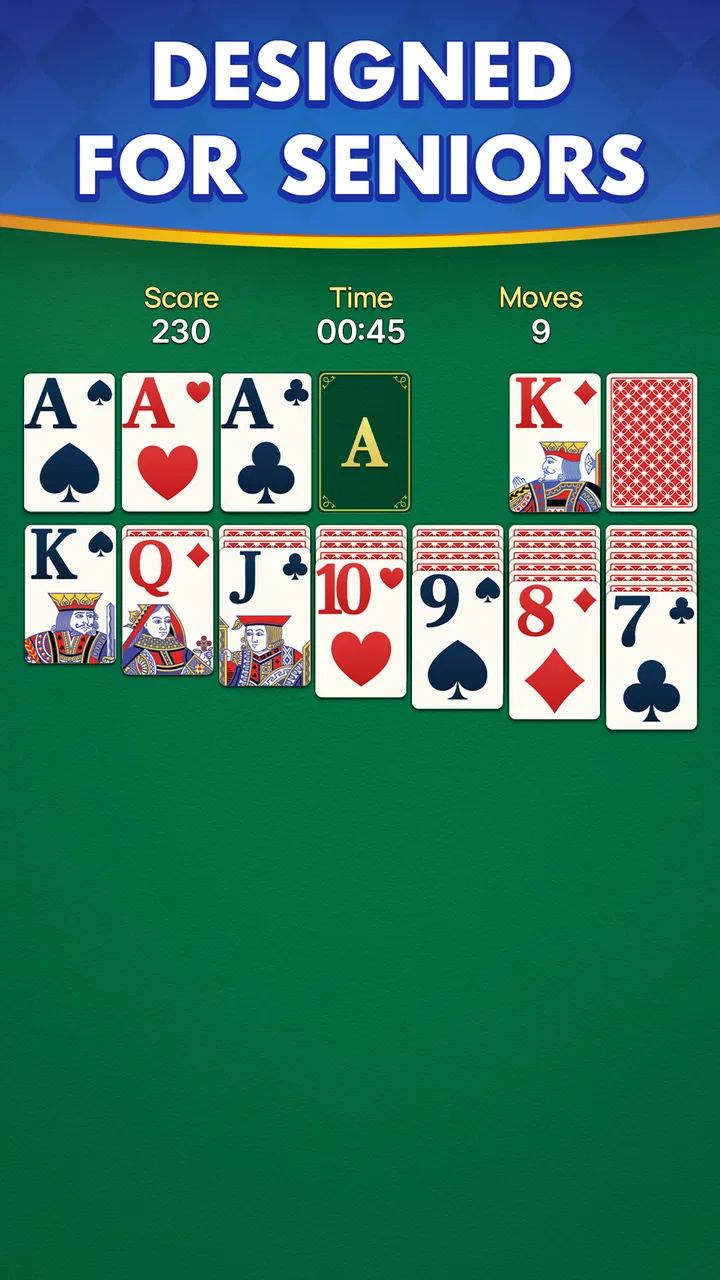
Vigor Solitaire is the kind of card game I can open without preparing myself for a complicated session. It is a free solitaire title from Mouse Games, aimed at players who want the familiar patience-style experience in a large-card presentation. I found its appeal less in novelty than in accessibility: the cards are meant to be easy to follow, the rules are recognizable, and a short break can become a complete game without demanding much attention.
That simplicity matters especially for seniors. Small symbols, crowded menus, or fast-moving game boards can turn a relaxing card game into an exercise in squinting and tapping carefully. This version takes a more comfortable visual approach, which makes it easier to focus on the actual decisions rather than fighting the interface. My overall impression is that it works best as a calm, straightforward companion for quiet moments, not as a feature-heavy card platform.
How Vigor Solitaire feels in everyday play
The first thing I noticed is how quickly the game gets to its central activity. Solitaire is already familiar to many players, so there is little learning overhead. You can sit down with a cup of tea, play a few moves, and stop when you feel like it. That makes it a practical choice for waiting rooms, relaxed evenings, or a short mental break between household tasks.
You May Also Like

 Pandora - Music & Podcasts
Pandora’s Music Is Easy to Start, but Harder to Recover
Pandora’s strength is its low-effort path from a seed to a station. Its weak spot is how much confidence it asks you to place in connection, setup, and quiet recovery.

 8 Ball Pool
 Is Built on Rivalries, Rematches, and Routine
A close look at the rivalries, rematches, shared routines, and unanswered safety questions that turn a quick pool match into a persistent mobile community.

 Samsung Music
’s Quiet Strength Is Playing What You Already Own
Its reach comes less from spectacle than from dependable access to a personal library. That simplicity is both the app’s strongest retention engine and its ceiling.

 AccuWeather: Weather Radar
AccuWeather Review: A Quick, Clear Forecast for Everyday Decisions
For everyday plans, the best forecast is the one you can understand quickly. AccuWeather makes rain timing, radar, and local conditions easy to act on, with a few trade-offs.

 Hill Climb Racing
Why Hill Climb Racing Still Turns Crashes Into One More Run
A tiny car, a bumpy hill and one more upgrade: Hill Climb Racing keeps resurfacing because its simple chaos makes every near-miss feel personal.

 AliExpress - Shopping App
AliExpress Makes Global Shopping Feel Personal, but Shoppers Bear the Risk
AliExpress turns a global marketplace into a pocket-sized discovery engine. Its reach is useful, its shopping loop compelling, and its trade-offs easy to miss.
More From Our News Desk
View All News


The large-card design is more than a cosmetic choice. It changes how comfortably I can scan the tableau and distinguish suits, ranks, and available moves. For older players, that can reduce the need to hold a phone unusually close or repeatedly check a card before tapping it. I still recommend trying the game on the actual device you plan to use, because screen size and brightness make a noticeable difference, but the presentation is clearly built around readability.
There is also a useful psychological advantage to a familiar card layout. A player who already knows solitaire does not have to spend time understanding a new board or learning a special scoring system before enjoying a round. Someone returning to the game after years away can usually recognize the basic flow immediately. That makes this a gentler recommendation than a more elaborate card game with multiple modes and unfamiliar rules.
At the same time, players looking for a fresh twist should keep expectations realistic. The attraction here is the classic card experience, not a deep campaign, a competitive ladder, or a constantly changing collection of challenges. If your ideal game includes dramatic effects, social play, or a large amount of customization, this may feel intentionally plain. I see that restraint as a benefit for seniors who prefer clarity, but it will not satisfy everyone.
Speed expectations without exaggerated promises
Because the game is built around a simple card table rather than a visually demanding action scene, I would expect it to feel lighter than many modern games. The board does not need the kind of continuous animation or complex 3D rendering associated with demanding titles. In practical terms, that makes it a sensible candidate for a phone used mainly for calls, messages, photos, and occasional games.
Still, “simple” does not mean every device will respond identically. A phone with limited free storage, many applications running in the background, or an older battery may take longer to open any game. If a card seems slow to respond, I would first close unused applications, check that the phone is not under heavy load, and try again before blaming the game itself. That is a useful habit for senior players because it separates a temporary device issue from a lasting problem with the app.
My preferred way to use it is in short, unhurried sessions. Solitaire does not benefit much from rushing, and a slightly slower pace can actually make the game more comfortable for someone who wants time to examine the layout. The important question is not whether it behaves like a high-end gaming title, but whether the cards remain readable and the controls feel predictable during ordinary play.
A practical tip is to play with the phone held steadily on a table rather than balancing it in one hand. That gives the other hand more control for selecting cards and reduces accidental taps. It also makes it easier to pause and inspect the board before committing to a move. This small change improves the experience more than chasing maximum speed, particularly for players with less precise touch control.
What happens during longer or heavier use
A single solitaire round is not the same kind of workload as a long session in a racing or adventure game. The board is comparatively restrained, so I would not choose this app because I wanted to test a phone’s gaming power. Its natural use case is repeated, moderate play: several rounds while relaxing, perhaps with the screen on for a while, rather than an intense marathon filled with demanding graphics.
For longer sessions, comfort becomes more important than raw performance. I suggest increasing the phone’s screen brightness only as much as necessary, taking breaks when your eyes feel tired, and keeping the device somewhere it will not be covered by fabric. These are ordinary precautions, but they matter when a senior player uses the game for extended periods. A clear card layout is helpful; it does not remove the need to rest your eyes.
One non-obvious advantage of a quiet card game is that it can fit around conversation. I can imagine playing a few moves while listening to a family member, then setting the phone down without losing the thread of a complicated story or mission. That makes it more suitable for shared spaces than games that demand constant attention. It is also a better option for someone who wants gentle mental activity without turning leisure time into a performance test.
The trade-off is that repeated play may expose the limited scope more quickly. Once the familiar solitaire rhythm becomes routine, players who need constant variety could lose interest. I would recommend it for steady relaxation rather than endless novelty. If you enjoy improving your decisions within one recognizable format, that repetition can be satisfying; if you need new rules every few minutes, another card game would be a better fit.
Reliability and recovering from interruptions
Reliability matters more to me here than flashy presentation. A senior-friendly solitaire game should make it easy to return to the cards after a phone call, a message, or a brief distraction. I would treat the app as most useful when it supports a simple routine: open it, make a few moves, pause when needed, and continue later without confusion.
Phone interruptions are unavoidable, so I recommend testing your own recovery pattern during the first few sessions. Start a game, leave it briefly, and return to see whether the board is still understandable on your device. This is not a claim about every phone or every circumstance; it is a sensible personal check before relying on the game during travel or while waiting for an appointment.
If the app ever closes unexpectedly, the safest approach is to reopen it calmly rather than repeatedly tapping the screen. Check whether the phone has enough free space, restart the device if other apps are also acting strangely, and make sure the operating system meets the stated requirement. These steps are especially useful for family members helping a senior remotely, because they provide a clear troubleshooting sequence without requiring technical knowledge.
I also like the fact that solitaire itself is easy to reconstruct mentally. Even if an interruption breaks your concentration, the board is usually more approachable than a game with a complex story, inventory, or multiplayer match. That does not guarantee that every unfinished round will be preserved, so I would avoid treating an active game as something that must survive a long interruption. For important appointments, finish or pause at a natural point instead.
Device limits and suitability for older phones
The game requires Android 6.0 or later, which gives it a broad compatibility range among Android phones still in everyday use. That is helpful for seniors who do not replace their device frequently. Before installing, I would ask a family member to check the phone’s Android version, especially if the device has been stored for years or has not received recent updates.
It is free to install, and the age classification is Everyone, so it is easy to consider for a shared family phone or a senior’s personal device. The absence of a purchase decision at the starting point lowers the barrier for someone who simply wants to try a classic card game. Even so, I would still install it through the normal app store route and review the phone’s available storage before beginning, since any installation can be frustrating when space is nearly full.
The current version is 1.8, and I would keep the app updated when the device offers a normal update through its store. Updates can be useful for compatibility and general maintenance, but I would not update immediately before an important trip without testing the game afterward. A quick opening and one short round are enough to confirm that the interface still feels familiar.
There is a simple accessibility workflow I recommend: enlarge the phone’s system text where possible, clean the screen, choose a comfortable viewing angle, and use the game in even lighting. System text changes may not enlarge every card, but they can make surrounding phone controls easier to handle. A stylus can also help a player who finds small touch targets difficult, although the value of that depends on the individual device and hand control.
Where this game may be less suitable is on a very small display or a phone with a damaged touch screen. Large cards help, but they cannot compensate for a screen that is dim, cracked, or inconsistent near the edges. In that situation, a tablet or a larger phone may improve the experience more than switching between similar solitaire apps. The physical device is part of the user experience, and this is particularly true for older players.
How it compares with familiar alternatives
Compared with a physical deck of cards, Vigor Solitaire is more convenient and less vulnerable to cards sliding across a table. It is ready whenever the phone is nearby, and the large-card layout avoids the need to shuffle, gather, and arrange a deck. A physical deck still wins for social play, tactile enjoyment, and screen-free relaxation, so I would not present the app as a replacement for family card time.
Compared with broader mobile solitaire collections, this game is appealing when you want a focused experience rather than a large menu of variations. A bigger collection may offer more layouts, daily tasks, statistics, or visual themes. Those extras can keep experienced players engaged, but they can also make navigation harder. For a senior who wants to recognize the game immediately and avoid exploring several layers of menus, the narrower approach may be more comfortable.
Compared with online competitive card games, it should be a calmer choice. Competitive alternatives may be better for someone who wants opponents, rankings, or a sense of urgency. I would choose this one for a player who prefers private practice and does not want strangers, timed turns, or social pressure involved in a quiet card session.
One useful decision rule is to ask what usually causes frustration. If the problem is difficult-to-see cards, this app’s presentation is worth trying. If the problem is boredom after familiar rounds, a feature-rich alternative is likely a better match. If the player wants to avoid screens entirely, a physical deck remains the obvious choice. That distinction helps prevent recommending a simple solitaire app to someone whose real need is variety or companionship.
Who will enjoy it, and who should skip it
I think Vigor Solitaire is a strong fit for seniors who already understand classic solitaire, want readable cards, and prefer a quiet game that can be played in small portions. It also suits relatives looking for an uncomplicated title to suggest to a parent or grandparent. The store shows a 4.9 average from around one thousand ratings, with over ten thousand installs, which suggests a positive reception among the people who have tried it. I treat those figures as encouraging context rather than a guarantee that every player will enjoy the same experience.
The developer is Mouse Games, and the game was released on January 27, 2026. Its recent release makes it sensible to pay attention to how it behaves on your particular phone rather than assuming that an older device will offer exactly the same experience as a newer one. A short trial is the best way to judge card visibility, touch response, and comfort for the person who will actually use it.
I would skip it if you need multiplayer, an extensive progression system, or a large variety of solitaire formats. I would also hesitate to recommend it to someone who dislikes playing on a phone, even if the cards are large. No interface can replace the feel of a real deck for a player who values physical cards, and no simple layout can create the excitement of a competitive match for someone who wants challenge from other people.
For a realistic everyday scenario, imagine a senior waiting while a prescription is prepared. A short solitaire round can fill that time without requiring sound, a login routine, or a conversation with another player. At home, the same person might play after lunch, stop when a visitor arrives, and return later when convenient. That flexibility is the central reason I would recommend it: the game fits around the day rather than asking the day to fit around it.
My performance verdict
After considering its focused design, large-card presentation, Android compatibility, and modest style of play, I see Vigor Solitaire as a sensible low-pressure choice for seniors who want classic solitaire on a phone. I would expect it to be easier on ordinary devices than graphically ambitious games, while still remembering that storage, screen quality, background apps, and touch condition affect the final experience.
Its strongest quality is not speed in isolation. It is the combination of a familiar format and a presentation that reduces unnecessary effort. That makes it easier to start, easier to explain to another person, and easier to fit into short breaks. The main limitation is equally clear: the focused approach may feel repetitive for players who expect new modes, social competition, or constant rewards.
My recommendation is simple: choose it for readable, private, everyday solitaire, but test it on the intended phone before making it a regular part of someone’s routine. The free price and Everyone classification make trying it straightforward, while the classic structure means most players can judge its appeal quickly. For seniors who value calm play over spectacle, this is a practical card game with a clear purpose.
In the end, I would recommend Vigor Solitaire to a friend who wants the familiar card table without the clutter often found in larger game collections. I would not recommend it as an all-purpose entertainment app or as a substitute for social card games. Used for what it does best—comfortable, unhurried solitaire—it offers a pleasant way to occupy a few minutes or settle into a longer, quiet session.
FAQs for Vigor Solitaire for Seniors
01What makes Vigor Solitaire for Seniors different from other solitaire games?
Vigor Solitaire for Seniors is specifically designed with seniors in mind, offering larger cards and an intuitive interface to make gameplay easy and enjoyable. The game features adjustable difficulty levels, making it accessible for all skill levels, and includes hints and tutorials to help players improve their strategies.
02Can Vigor Solitaire for Seniors be played offline?
Yes, Vigor Solitaire for Seniors can be played offline, making it perfect for users who may not always have internet access. This feature allows players to enjoy the game anytime and anywhere, without worrying about connectivity issues or data usage.
03Are there any in-app purchases in Vigor Solitaire for Seniors?
While Vigor Solitaire for Seniors offers a free version with basic features, it also includes optional in-app purchases. These purchases may provide additional card designs, themes, or advanced hints. However, the core gameplay remains accessible without any purchases, ensuring a fair and enjoyable experience for all players.
04Is Vigor Solitaire for Seniors available on both Android and iOS?
Yes, Vigor Solitaire for Seniors is available for download on both Android and iOS devices. Users can find it in the Google Play Store and the Apple App Store, ensuring compatibility across a wide range of smartphones and tablets. Regular updates keep the app running smoothly on all supported devices.
05Does Vigor Solitaire for Seniors offer any accessibility features?
Absolutely. Vigor Solitaire for Seniors includes several accessibility features to enhance the gaming experience for all users. These include adjustable text size, voice guidance, and customizable color schemes to assist those with visual impairments. The game is designed to be as inclusive and user-friendly as possible.
Pros
- User-friendly interface for easy navigation.
- Large card graphics for better visibility.
- Includes daily challenges for engagement.
- Customizable settings for personal preferences.
- Offline mode available for convenience.
Cons
- Limited variety of solitaire games.
- No multiplayer or social features.
- In-app ads can be distracting at times.
- Lack of detailed tutorials for beginners.
- Requires frequent updates for new content.

Vigor Solitaire for Seniors
Gallery